
Integrated Business Planning (IBP) software connects demand, inventory, finance, and operations into a single process.
Here are the seven providers most frequently chosen by manufacturers and distributors in LATAM and Spain, along with their strengths and limitations.
During 2025, supply chains became increasingly volatile and decisions had to be made faster than ever. That is why choosing the right software is essential to ensure accuracy, agility, and visibility.
Below, we will look at the best Integrated Business Planning software for 2026.
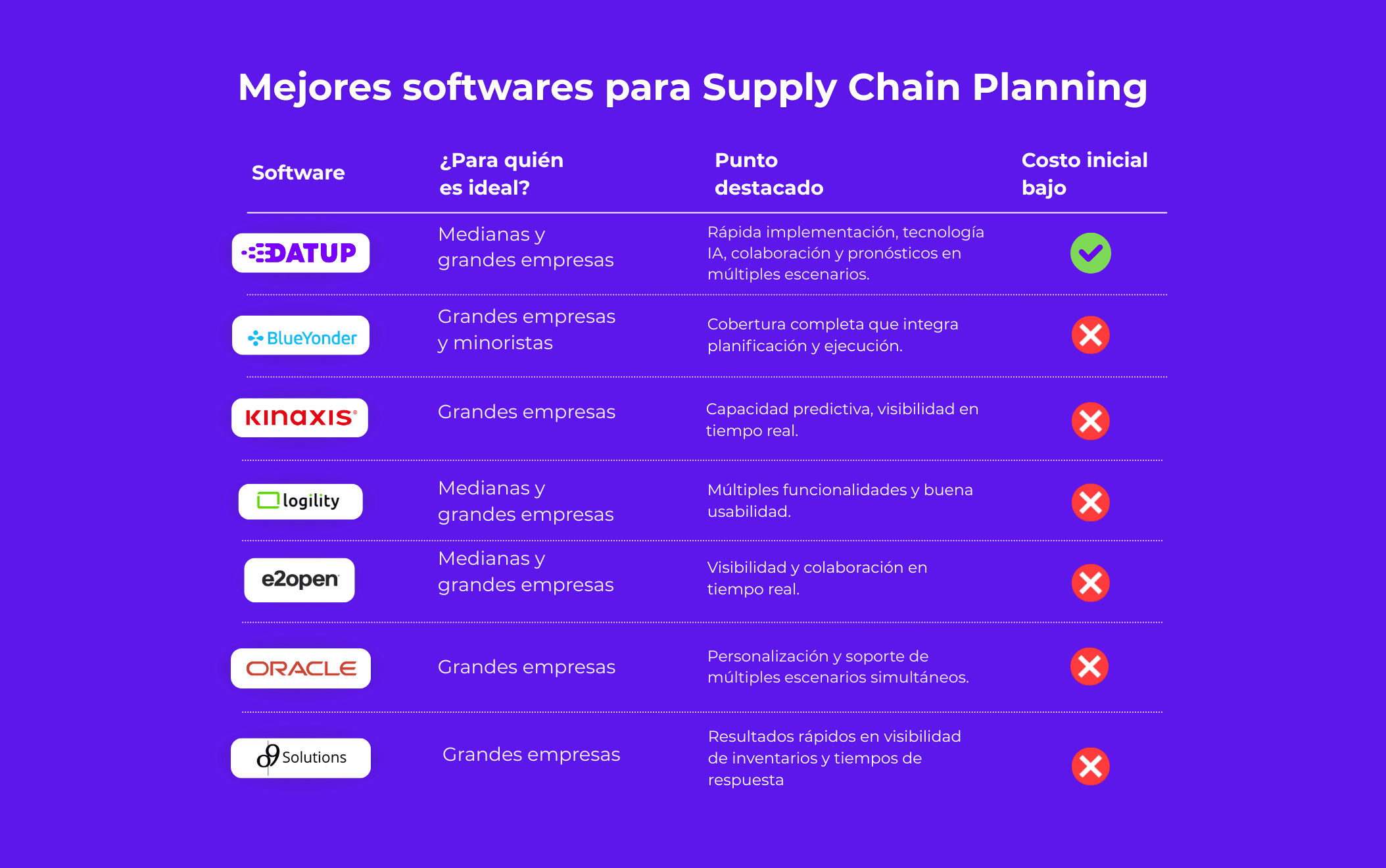
Best IBP Software 2026: comparison chart of the 7 vendors
What is integrated business planning (IBP)?
IBP (Integrated Business Planning) is the process that unites demand planning, supply planning, inventory, and financial planning into a single plan.
IBP software helps maintain that plan: it keeps forecasts, supply plans, inventory policies, and financial projections in one place so that everything is connected.
The IBP and S&OP are different processes; S&OP aligns supply and demand, while IBP adds the financial plan and strategic horizon on top. S&OP ends when sales and operations agree on volume. IBP ends when finance can sign off on that plan in dollars or euros, 18–36 months out, with budget gaps laid out on the table.
1. SAP Integrated Business Planning (IBP): for large SAP-ecosystem manufacturers
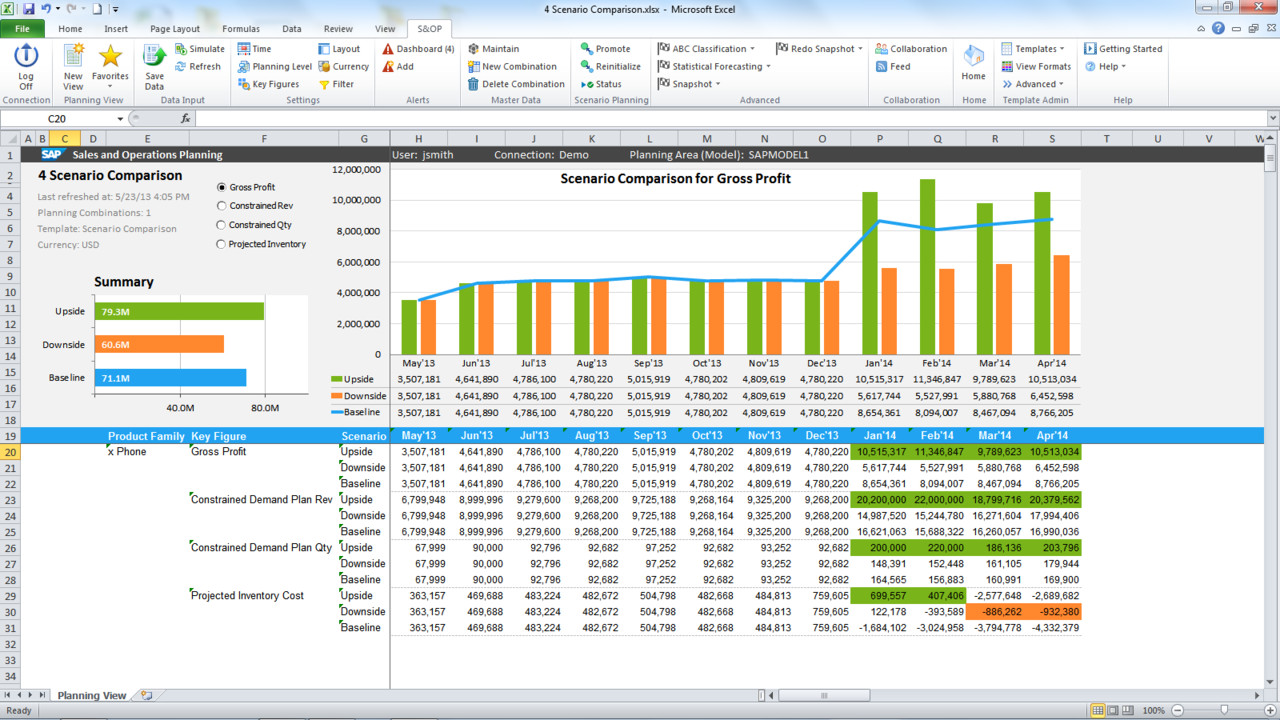
SAP IBP is the brain of the SAP ecosystem. It is a cloud-native system built on SAP HANA that integrates demand, supply, inventory, response, S&OP, and scenario simulation.
Key features of SAP
SAP IBP has the ability to combine advanced analytics in an integrated way. Its main features include:
- AI for demand forecasting based on statistical analysis, adapting to both external and internal signals.
- Constraint-based models, combining inventory, lead times, and actual availability.
- Inventory optimization, to align stock levels with risk, variability, and service goals.
- Collaborative S&OP that provides an integrated view so that sales, finance, and supply teams can work in coordination.
- What-if simulation, to evaluate different strategic paths and anticipate potential disruptions.
- Excel integration, which facilitates adoption for teams accustomed to using spreadsheets.
- Control Tower, to monitor the supply chain and its performance in real time.
Advantages
SAP IBP offers a high level of maturity, great precision, and seamless integration. In a short time, it achieves improvements such as:
- Stable and accurate forecasts.
- A smooth data exchange flow between planning and finance.
- The ability to reduce inventory without compromising service levels.
- In-depth analysis of complex structures.
- Integration of machine learning to adjust for demand in real time.
Cons
However, the power offered by SAP IBP comes with certain requirements:
- It has a steep learning curve, especially if the company has not previously worked within the SAP ecosystem.
- High licensing and implementation costs.
- Limited flexibility, as requesting customizations is expensive.
- Long implementation times.
Use cases
Manufacturing companies, global retailers, and FMCG organizations have successfully incorporated it, achieving:
- A reduction in stockouts across complex networks.
- Unified planning across sales, marketing, and supply.
- The ability to adjust quickly to highly volatile environments.
Price and licenses
This tool operates on a subscription model that depends on the size, modules, and volume of the planning.
- This structure offers basic, accessible editions for small teams.
- Enterprise pricing based on Cost of Goods for global corporations.
- Implementations exceeding $100,000 USD.
SAP IBP is a high-end, high-performance solution that allows for real-time alignment of planning and execution, consolidating scattered data and providing a comprehensive overview.
2. Datup AI: AI-powered IBP for mid-market and large enterprise
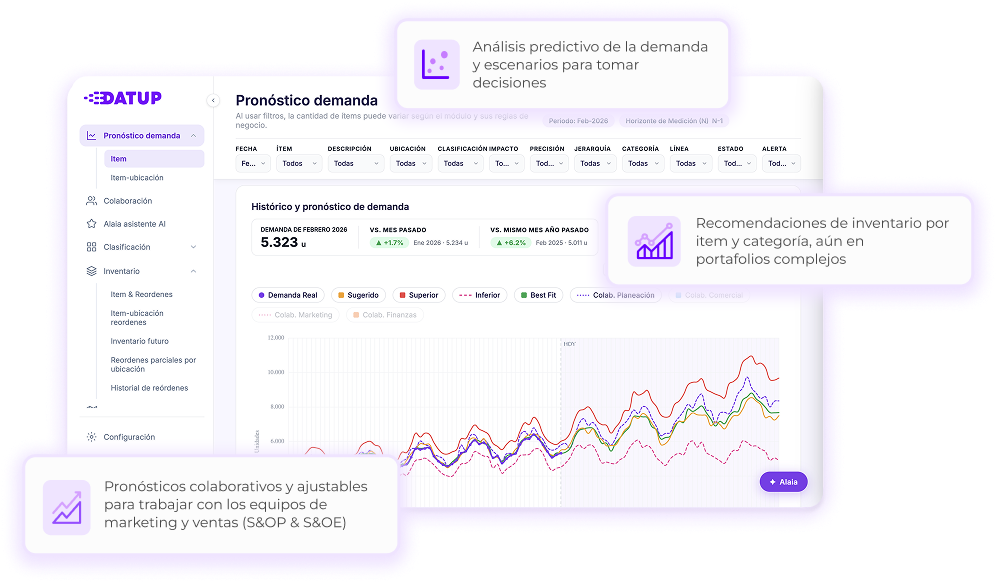
Datup is a predictive analytics SaaS platform that helps companies better manage their supply chain. It uses Artificial Intelligence and Machine Learning to anticipate demand and optimize inventory, connecting demand planning with commercial and financial goals.
What Datup does
Datup processes historical data and turns it into actionable insights for decision-making. These are its main features:
- AI-powered demand forecasting: It uses machine learning models that account for seasonal patterns and external factors to predict your sales.
- Inventory optimization: It automatically calculates how much safety stock you need, when to place orders, and what the actual lead times are. The goal is to have enough product on hand without unnecessarily tying up capital.
- Product classification: It applies ABC, XYZ, and FSN analysis to identify which products are most important based on sales volume, profitability, and demand variability.
- Collaboration: Provides real-time dashboards and metrics so that Sales, Finance, and Supply Chain teams work with the same information.
- AlaIA (conversational assistant): A chatbot trained on your company's data that can quickly answer queries and generate reports.
- Integration with other systems: Connects with ERPs such as SAP, Oracle, NetSuite, or Odoo, and can also incorporate external data like weather information or economic indicators.
Advantages of implementing Datup in your company
- Rapid implementation: Unlike other solutions on the market, Datup can be up and running in approximately 5 weeks (depending on the quality of your data and the speed of information delivery).
- More accurate forecasts: Improves the accuracy of demand predictions with advanced models tailored to the nature of each industry.
- Cost reduction: Decreases both stockouts and excess inventory, which translates into cost savings.
- Security: It meets all ISO 27001 certification requirements for data protection.
- Scalability: As a SaaS solution, it can grow alongside your business needs without requiring new infrastructure.
Limitations
- Requires quality data: To work effectively, you need organized historical data in your system (ERP). If your data is disorganized, the results will not be optimal.
- Mindset shift: Teams need to get used to making decisions based on data rather than just intuition or experience. This takes time and can cause friction in the initial stages.
Use cases
Manufacturing, retail, pharmaceutical, and consumer goods companies use Datup to:
- Automatically plan for thousands of different products without increasing headcount
- Optimize inventory levels across multiple warehouses or points of sale
- Adjust production based on actual demand to avoid stockouts
Price
Datup operates on a SaaS subscription model:
- Variable cost: It depends on the number of products and locations you manage, and which modules you use.
- No infrastructure required: You don't need to buy servers or make large initial investments in equipment.
- Geared toward medium and large enterprises: The model is designed for organizations looking to improve their operating margins through better inventory management and optimization.
3. Kinaxis RapidResponse: for scenario planning at scale
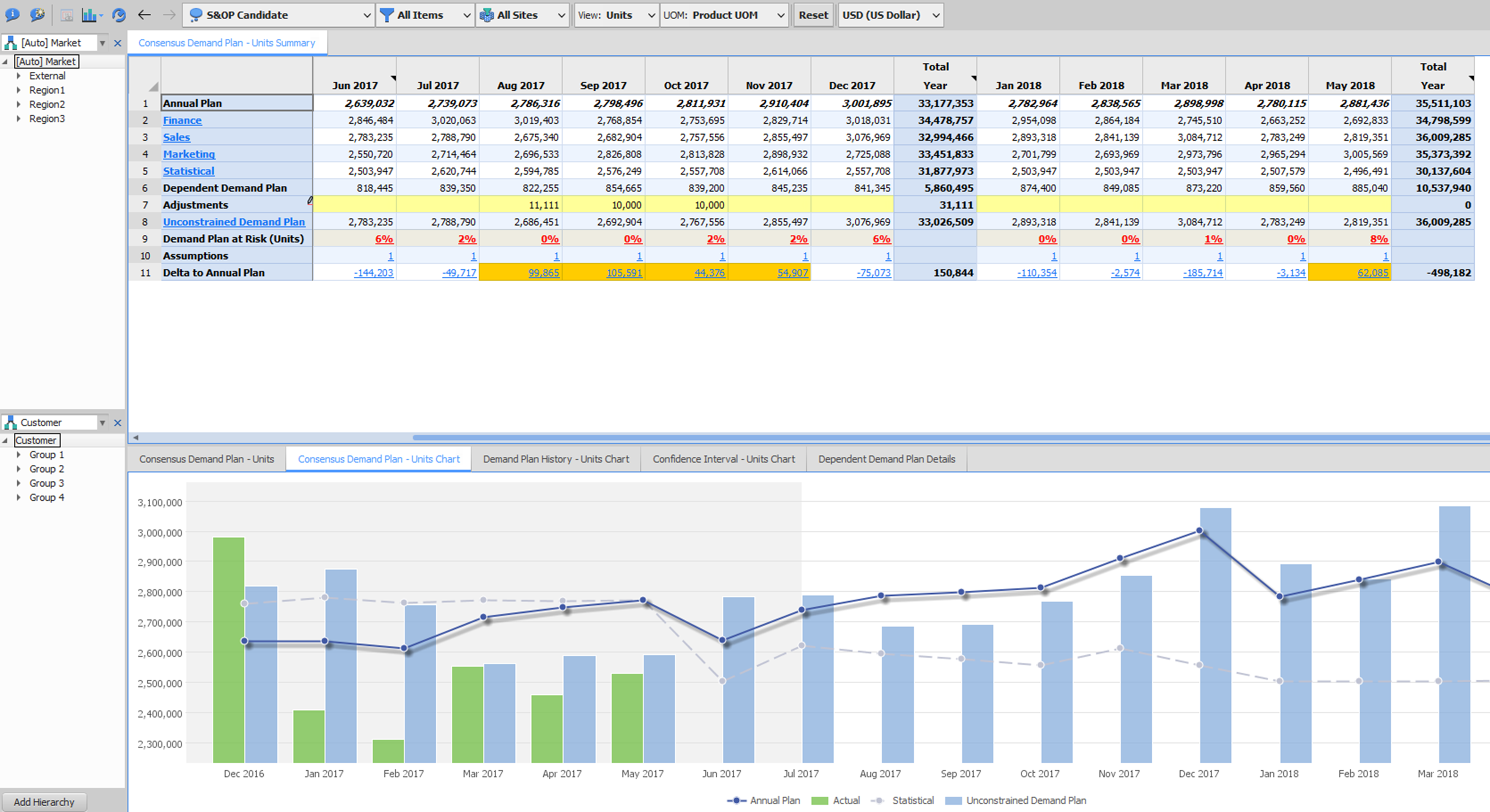
Kinaxis RapidResponse stands out for its concurrent planning: if something changes, the system immediately recalculates the impact of that change on inventory, orders, capacity, suppliers, and constraints.
Key features
Kinaxis features a cloud-native architecture, AI, and a simulation engine that stands out for its speed.
Its main features include:
- Consolidating internal and external data with Data Fabric.
- Intelligence Engine for real-time calculations.
- Features scenarios and digital twins that can be compared instantly.
- Planning.AI, to integrate heuristics and machine learning.
- Enables planning under uncertainty thanks to its buffer optimization.
- An Excel-like interface, making it easy for users to adopt.
These components enable collaborative and synchronized planning cycles across different departments.
Benefits
Its implementation leads to rapid improvements, such as:
- Reducing planning cycles by over 50%.
- Greater coordination between purchasing, production, and sales departments.
- Decreased final inventory levels and lead times.
- High cross-functional, real-time visibility across the entire supply chain.
- Effective data relay that uncovers hidden errors.
These improvements rely on concurrency to facilitate decision-making.
Cons
This tool requires clean data, clear processes, and trained teams, so the main challenges include:
- Steep learning curve: its interface can be very technical at times.
- Variable performance when the client's architecture is not optimized.
- High annual investment, both in licenses and implementation.
- Long implementation times that can last from 12 to 18 months.
These are factors to evaluate to determine if it is appropriate for each company's level of technological maturity.
Use cases
It is effective for industries where an unexpected change can affect the entire operation, such as:
- Aerospace and defense: by integrating capacity, materials, and supplier availability.
- Retail and foodbecause it reduces stockouts in stores and anticipates demand.
- Technology and electronicsbecause it allows for the management of variable components and the coordination of decisions based on comparative scenarios.
Pricing and licensing
Its pricing model is geared toward corporations with global chains. It offers:
- High annual subscriptions, determined by the modules and their complexity.
- Implementation costs that can scale in multinational deployments.
- More accessible options like Planning One.
When a company has reached operational maturity, the reduction in inventory, the acceleration of the planning cycle, and the improvement in service levels justify the investment.
4. o9 Solutions: for multinational demand and supply orchestration

o9 Solutions combines artificial intelligence, business knowledge, and integrated planning in its Digital Brain.
Its goal is to connect inventory, sales, customer data, external variables, risks, and more, enabling real-time decision-making by understanding the impact of each choice.
Main Features
o9 is designed to optimize everything from demand planning to commercial and risk decisions.
Its main features include:
- Its Enterprise Knowledge Graph (EKG) component that unifies structured and unstructured data by connecting scattered information.
- Advanced demand planning based on predictive models.
- Scenario simulations with “what-if” analysis.
- Its Supplier Collaboration module which enables collaboration with suppliers across multiple levels of the supply chain.
- Revenue Growth Management (RGM) which analyzes the impact of pricing strategies on demand and margins.
- Its integrated ESG and risk capabilities which incorporate parameters such as sustainability and risk into planning decisions.
Benefits
Its main strength is its analytical depth and its ability to process large volumes of data efficiently.
Companies working with o9 report:
- Increased demand accuracy.
- Reduced inventory levels.
- Faster insights for business decision-making.
- A unified view of long-, medium-, and short-term plans, preventing departments from planning in silos.
Cons
This level of sophistication requires a structured approach, clear executive sponsorship, and teams capable of adapting to change.
The drawbacks to consider are:
- Its high cost.
- Its technical challenges due to heavy analytics and complex configurations.
- A steep learning curve.
- Dependency on integrators (such as Accenture, Deloitte, or EY), which adds costs and requires coordination.
Use cases
o9 Solutions is chosen by major multinationals looking to connect commercial, operational, and financial decisions.
- PepsiCo uses Digital Brain to coordinate its cross-domain planning on a single platform.
- Estée Lauder chooses it for its customization capabilities, which allow it to adapt to changing environments.
- In retail, as it allows for processing millions of records and anticipating inventory trends.
- In consumer packaged goods (CPG), as it requires intelligent and flexible models like those offered by the platform.
Price and licenses
o9 has an approach fully personalized. The investment usually includes:
- Platform licenses.
- Specific advanced AI modules.
- Consulting and external integration services.
- It doesn't have free versions or entry models.
5. Anaplan: for FP&A-led integrated planning
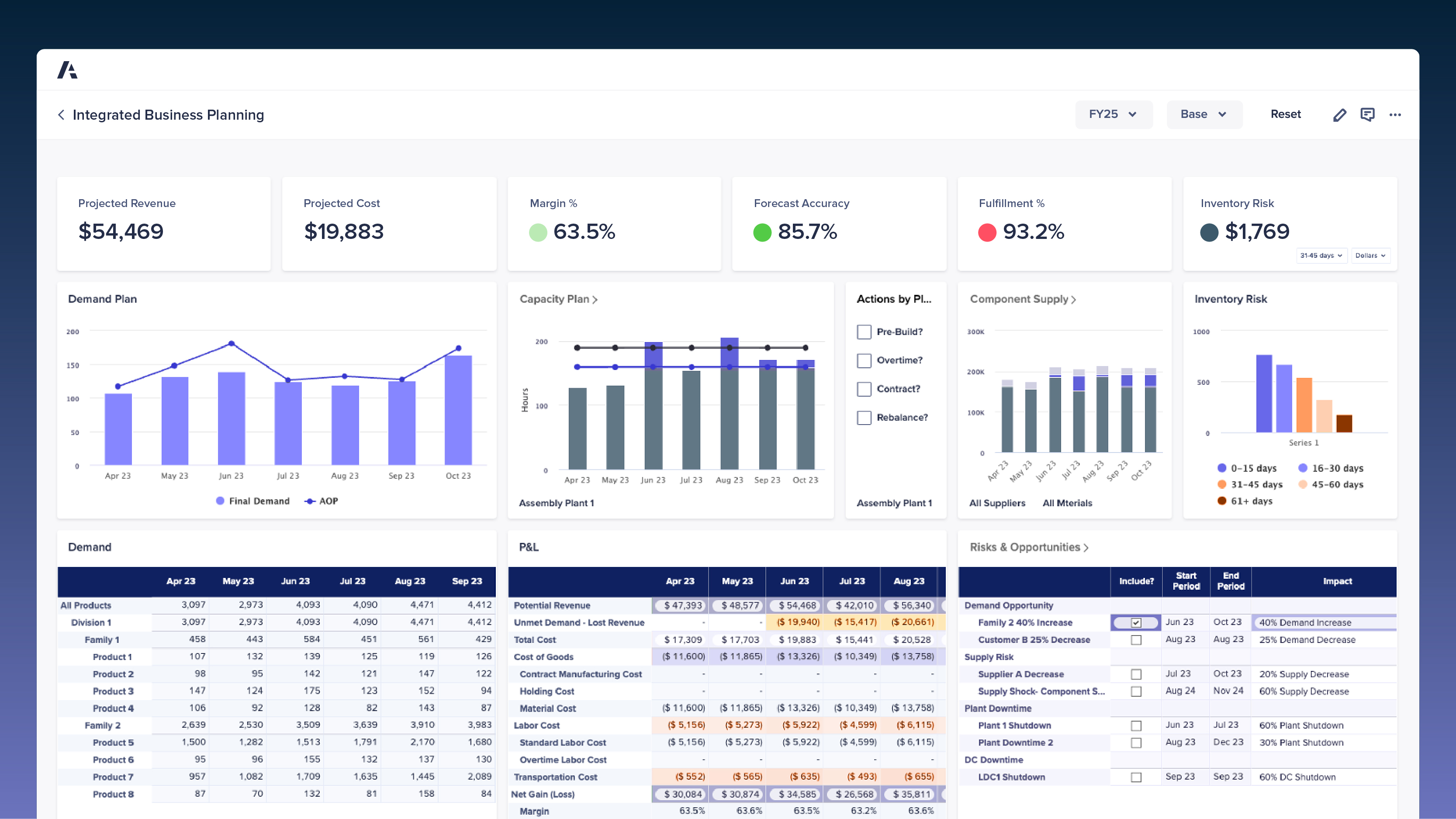
Anaplan seeks to connect financial, operational, and strategic planning within a flexible and dynamic model. It features an engine, that performs complex calculations to react in real time, allowing for the management of multidimensional scenarios.
Key features
Anaplan is a particularly useful tool for companies that need to model operations, sales, and finance without rigid constraints.
Its main features include:
- Its multidimensional models with high granularity.
- Planning that connects finance, operations, sales, and supply chain.
- Its Breakback add-in, for making top-down and bottom-up adjustments within the same model.
- Dynamic integration with ERPs, CRMs, and other data sources.
- Its PlanIQ module, with predictive algorithms.
- Great governance.
Advantages
Its main advantage is its flexibility, allowing models to be built according to business logic, whether by units, geographies, products, scenarios, versions, inventory policies, channels, or whatever the company needs.
Companies that choose it can:
- Connect their budgets, forecasts, and supply planning on a single platform.
- Reduce manual work.
- Improve forecast accuracy thanks to working with consistent data and real-time calculations.
- Achieve cross-functional visibility.
Disadvantages
Having this level of flexibility also means taking on greater responsibility to leverage it by correctly modeling processes, rules, and hierarchies.
Things to consider:
- Costs are high.
- It has a steep learning curve.
- It lacks certain classic Excel features, which means modifying some workflows.
- Its implementations are complex and can double costs.
It is a platform that requires maturity and clarity in process design.
Use cases
Anaplan is ideal for industries where planning requires precision.
- In retail it is the preferred choice as it allows for the coordination of inventory, campaigns, and budgets in one place.
- In consumer packaged goods (CPG) it integrates sales, demand, and production, improving synchronization.
- In corporate finance it allows for the automation of budgets, forecasting, and consolidations, reducing time and manual errors.
- In operations it enables the management of multidimensional processes in companies with multiple geographies and business units.
Its flexibility allows a single environment to support tactical, operational, and strategic use cases, without fragmentation between functions.
Pricing and licensing
Its cost model depends on the tier, of the workspace and the number of users. Some estimates suggest:
- Investments starting from 20,000 USD per year.
- This can reach 6 figures for medium or global implementations.
- Adding modules such as PlanIQ or Enterprise capabilities increases the cost.
6. Oracle SCM Cloud: for cloud migrations on Oracle
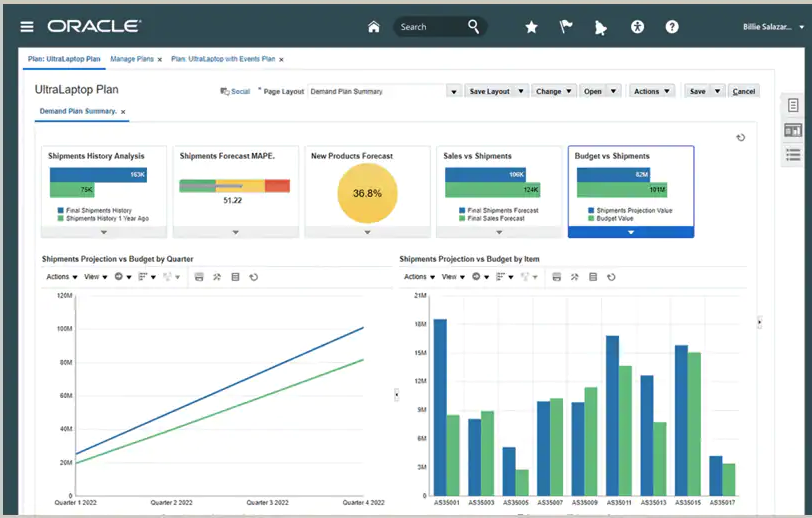
Oracle Fusion Cloud SCM is one of the most comprehensive suites that integrates planning, procurement, logistics, inventory, and execution into a single platform. It uses AI, constraint-based models, and "what-if" analysis.
Key features
Oracle SCM Cloud stands out from other options by combining traditional processes with AI-based solutions.
Its main features include:
- Incorporating Demand Sensing with AI to achieve accurate forecasts.
- Constraint-based planning models that account for capacity, materials, and labor.
- Parallel scenario evaluation, which facilitates comparative decision-making.
- Early detection of at-risk demand to help reduce stockouts.
- S&OP that connects sales with production and finance.
- Ability to execute multiple plans simultaneously.
- Reduced reliance on external tools, thanks to its integrated ecosystem.
Efficiency, control, and foresight define its structure.
Advantages
Oracle SCM Cloud is a great addition for companies seeking operational stability, standardized processes, and a shift toward cloud models.
Key advantages include:
- Comprehensive visibility of inventory, demand, and the supply chain.
- Process automation, to reduce errors and manual turnaround times.
- Faster implementations than traditional ones.
- Its robust security and cloud-native scalability.
- Its seamless integration with other Oracle modules.
These advantages make it a reliable, well-structured platform suitable for established companies.
Cons
While it is a powerful option, it can present significant challenges for companies with legacy systems or extensive prior customization.
Keep the following aspects in mind:
- The learning curve for users accustomed to older ERPs can be quite steep.
- The cost per user can add up, depending on the selected modules.
- Complex customizations require specialized technical expertise.
- Integration is challenging with systems that were not designed for cloud environments.
These points do not prevent implementation, but they do highlight the need for a clear implementation strategy.
Use cases
Oracle SCM Cloud is chosen by companies seeking coordination across multiple areas and high visibility of their supply chain.
It is chosen in the following sectors:
- Omnichannel retail, to manage inventory, replenish stock, and coordinate demand across different channels.
- Complex manufacturing , as it allows for the synchronization of capacity, materials, and production planning.
- Distribution, thanks to the high level of inventory control and planning optimization for extensive networks that it offers.
- Companies looking to migrate from legacy systems, as it allows for an orderly transition to cloud models without losing operational continuity.
Pricing and licensing
Its pricing model is based on per-user subscriptions. In the market, some reference values are mentioned:
- Between 50 and 200 USD per user per month, depending on the modules and features.
- Total costs may increase based on the scope, customization, and size of the company.
- Free trials are available to evaluate its capabilities before committing to the investment.
7. Blue Yonder: for operations with critical logistics
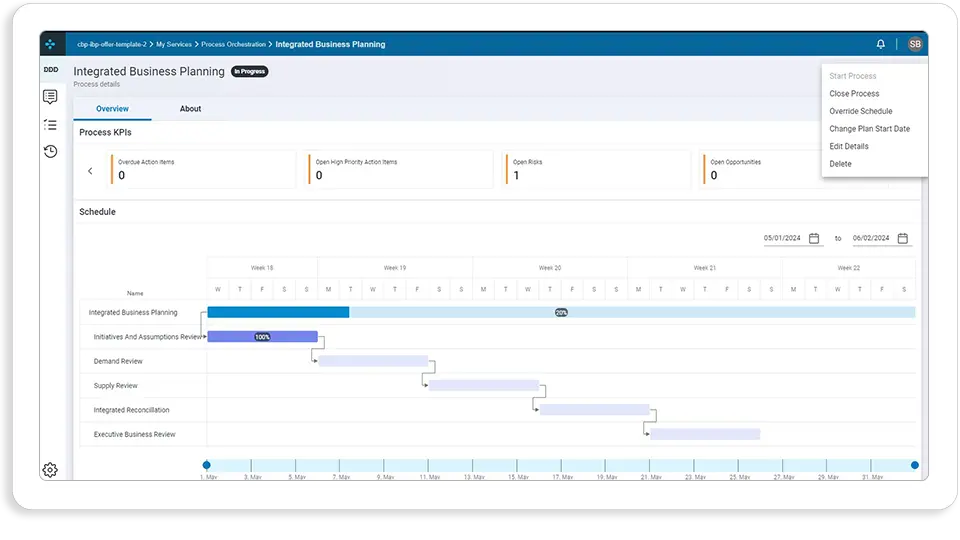
Blue Yonder, formerly known as JDA, is one of the most established platforms for planning, logistics execution, and supply chain optimization. Its Luminate, ecosystem combines machine learning, digital twins, and advanced modules to close the loop on end-to-end planning, execution, and real-time monitoring.
Key Features
Blue Yonder is built on predictive technology, automation, and optimization, enabling precise oversight and execution of the supply chain. This makes it ideal for industries with high logistics demands.
Its main features include:
- Demand planning with machine learning, to adapt to changing patterns.
- Inventory optimization, to reduce excess stock without sacrificing availability.
- Production and network planning, useful for multi-node operations.
- The most robust enterprise WMS on the market.
- High-complexity TMS, for use with multi-carrier transport networks.
- Digital twins to evaluate and predict future operational scenarios.
- Logistics Network, which allows for the synchronization of suppliers, partners, and carriers.
- Luminate Control Tower, to monitor performance, risks, and disruptions in real time.
Advantages
Blue Yonder is a top choice for large-scale operations where logistics execution is just as critical as planning.
Key benefits include:
- Reliable forecasting for retail and consumer goods.
- Leading WMS and TMS, adopted by major global operators.
- Route and resource optimization for reducing time and costs.
- Complete visibility thanks to the Luminate control tower.
- Frequent recognition by Gartner, which reinforces its maturity.
- Automation of operational tasks, which reduces manual effort and errors.
Its comprehensive approach advocates for true synchronization between what is planned and what actually happens on a day-to-day basis.
Cons
The main challenge with this tool is its technological depth, which requires a solid structure, resources, and a consolidated data ecosystem.
- It is slow when handling massive loads or processes with thousands of simultaneous variables.
- It experiences interruptions in backend jobs, according to some users.
- Its support is inconsistent, which worsens as more customizations are added.
- Its interface is functional but outdated compared to more modern competitors.
- Its implementation costs are high, as it requires specialized consultants.
Use cases
Blue Yonder is a top choice in industries where logistics coordination is critical and operational volume demands precision.
Its most typical uses include:
- Supermarkets and retail, as it allows for replenishment, demand forecasting, and in-store availability management.
- Logistics operators (3PL/4PL), due to its ability to manage multiple warehouses and clients.
- Manufacturing, due to its excellent results in synchronizing production, supply, and distribution.
- Companies with extensive transport networks, which require constant optimization.
Bridging planning and execution makes it the ideal choice for companies operating at scale.
Pricing and licensing
Blue Yonder uses a custom pricing model that varies based on the industry, the selected modules, and the size of the logistics network.
Some estimates include:
- Mid-sized implementations can be used starting from intermediate investment levels.
- Enterprise projects can reach costs of millions of dollars.
- Consulting and support represent a significant portion of the total cost due to its functional depth.
With this in mind, Blue Yonder is a platform designed for organizations seeking end-to-end optimization and that can sustain a commensurate investment.
Criteria for choosing IBP software and comparing providers
To choose an IBP platform, you must understand how it fits your operations, your technological maturity, and the actual complexity of your supply chain. There are several criteria for making a clear and practical decision.
1. Alignment with business objectives
To start, you need to know what you want to improve: forecasting?, inventory?, collaboration?, decision-making speed?, or cross-departmental connectivity?
We can ask ourselves a few key questions:
- What is currently impacting the business the most?
- Where could an IBP generate an immediate impact?
- Which areas need to hand off to one another?
2. Integration with existing systems
For an IBP to work, data must flow seamlessly. You need to review:
- Its compatibility with your ERP;
- Integration with warehouse or transportation systems;
- Available APIs and connectors;
- Breaking down silos between teams.
3. Scalability and flexibility
It is important that the chosen tool can grow and adapt with the company. Key aspects to consider include:
- the ability to handle increasing data volumes and complexity;
- the ease with which models can be customized;
- support for multiple parallel scenarios.
4. Advanced analytics
The IBP you choose should not only describe, but also predict and recommend. Look for one that features:
- AI and machine learning focused on demand;
- rapid “what-if” simulations;
- dashboards with clear visualizations for non-technical users;
- prescriptive analytics to anticipate risks.
5. User experience
An easy-to-adopt tool will determine whether the team can actually use it and make it work. It must have:
- an intuitive interface;
- a gentle learning curve;
- training;
- available support.
6. Cross-departmental collaboration
If the tool doesn't improve collaboration between departments, it isn't working. It must include:
- shared workflows;
- version approval;
- joint visibility of KPIs;
- change traceability.
7. Total cost and return
Cost shouldn't be viewed solely in terms of the license; you have to look at the full package:
- licenses + implementation + consulting + support;
- training and organizational change costs;
- estimated ROI.
8. Data quality and governance
The chosen IBP should have clean, consistent, and secure data. You must verify:
- the current state of the data;
- access controls;
- quality and audit rules;
- the ease of consolidating multiple sources.
9. Partner ecosystem
The speed of implementation will depend on the partners you work with.
It is important to consider:
- the availability of specialized integrators;
- industry experience;
- ongoing support and updates.
10. Technology roadmap
The tool must be able to evolve with the company and the market. You should look for:
- what investment is being made in generative AI and automation;
- the capabilities of digital twins;
- how frequently new features are released;
- whether there is a clear long-term vision.
Benefits of IBP tools for your operations
A good IBP system transforms how an organization plans, decides, and executes, such that:
1. Better decision-making and integrated visibility
All teams work with the same information, which improves:
- Real-time insights.
- Cycles by 50%.
- The evaluation of operational, financial, and commercial impacts.
2. Greater forecast accuracy
A good IBP improves forecast quality, which:
- Increases accuracy from 15% to 40%.
- Reduces stockouts and overstock.
- Dynamically adjusts to changes in demand.
3. Cost optimization and operational efficiency
The financial impact is direct; companies achieve:
- Inventory reductions of 10–30%.
- Up to a 10% reduction in total operating costs.
- Optimizing resources and capacity.
- Eliminates repetitive manual work.
4. Organizational alignment and real collaboration
IBP eliminates functional silos, fostering:
- Better communication between sales, finance, and supply chain.
- Reduction of unproductive meetings.
- Coordination between departments.
5. Greater agility and resilience
Companies can anticipate changes.
- Detecting supply or demand risks early.
- With rapid simulations of alternative scenarios and contingencies.
- To redirect production, inventory, or transportation.
6. Better customer experience and satisfaction
Having more coordinated processes allows for consistent service.
- Reduces delivery times.
- Improves fulfillment rates.
- Ensures the right product is available in the right place.
7. Scalability and growth support
A good IBP system should grow with the company.
- To support more SKUs, markets, and channels.
- To avoid multiplying spreadsheets and manual processes.
- Improve control of new units.
8. Operational sustainability
Better planning reduces environmental impact.
- There is less waste from overproduction.
- Less transportation.
- Energy and resource optimization.
What is the best IBP (Integrated Business Planning) software?
There is no one-size-fits-all solution. It depends on your company size, the ERP you already have, and whether the cycle is led by supply chain or finance. SAP S/4HANA at enterprise scale: SAP IBP. Demand volatility in global manufacturing: Kinaxis RapidResponse. Mid-to-large companies needing AI-driven forecasting in weeks: Datup. Finance-led cycles: Anaplan.
Which platforms offer integrated business planning and forecasting?
All seven compared here do. What differs is where the engine sits: SAP IBP, Kinaxis, o9, Oracle and Blue Yonder start from supply chain and add finance; Anaplan starts from FP&A and adds supply chain; Datup starts from AI demand forecasting and inventory optimization, built for mid-market teams.
What is IBP and what does it mean in supply chain?
IBP stands for Integrated Business Planning. It is the process that connects demand, supply, inventory, and finance into a single monthly cycle, using a shared set of numbers and a rolling horizon of 18 to 36 months. In logistics, it is used to distinguish it from S&OP: IBP closes the loop with the financial plan, not just the volume agreement.
.png)
%20Software%20for%202025%20(3).png)