The best inventory management software with AI are: Datup, RELEX, Netstock, Anaplan, Streamline, SAP, Kinaxis, Zoho Inventory and Odoo.
Choosing the wrong one is expensive in two directions: excess inventory freezes working capital you need elsewhere, and every stockout hands a sale to your competitor. Each of these AI inventory management systems has its own specialty, pricing model and target company size. We break down the 9 best so you can pick the one that fits your operation.
Comparison Chart of the 9 Best Inventory Management Software with AI in 2026
What is AI-powered inventory management software?
An inventory management software with artificial intelligence is a tool that automates stock control using intelligent algorithms. It allows you to manage inventory levels with greater precision, calculate more efficient reorder points, optimize product turnover and make faster decisions, all with less operational effort and reduced costs.
Best AI inventory management systems by company size
Company size is the filter that decides most of this list. A tool built for a 200-SKU store will not hold a network of warehouses, and an enterprise suite will sit unused in a business that has three buyers. This is where each option lands.
For small business
- Zoho Inventory: the accessible entry point if you want a supported product with a published price (from $29/month). Multichannel stock sync out of the box, without a planning project.
- Odoo Inventory: the free option. One app at no cost with unlimited users, barcode operations included, as long as rule-based replenishment is enough for you.
For mid-market
- Netstock: the logical choice when you already run an ERP and want predictive planning on top of it. Pre-built connectors to 11+ ERPs instead of a custom integration.
- Datup: the fastest path to a working forecast for mid-market supply chain teams. Implementation in 8 weeks, monthly subscription with no additional cost per user.
- Streamline: for operations with moderate complexity that need item, channel and location visibility, and can absorb a setup and training effort.
For enterprise and global operations
- Kinaxis: the strongest all-round enterprise option. Concurrent planning with real-time “what if” scenario simulation across the whole supply chain.
- RELEX: the specialist for retail and consumer goods, from forecast to shelf, including perishable and seasonal products.
- SAP: the option if your operation already runs on SAP and you want inventory to live inside the same ERP, with the implementation timeline that implies.
- Anaplan: for connected planning across finance, sales and operations, when the budget model matters as much as the stock model.
- Datup: also fits enterprise supply chain teams that want results in weeks, with unlimited users and no lock-in.
Two notes before you shortlist. Only Zoho and Odoo publish public pricing. For the other seven, budget comparison happens after a sales call. And every option on this list needs clean history, item masters, lead times and supplier records, before the AI adds anything on top.
What criteria should you consider when choosing inventory management software?
Not all inventory management solutions are the same, even if you find that they claim to have 'similar' functionality. We'll tell you what criteria you should take into account and how you can know which is the best alternative for your company.
1. Advanced predictive analytics
Modern inventory management software must include advanced forecasting algorithms that allow us to accurately anticipate demand and optimize inventory levels dynamically and in real time.
Being able to simulate different situations and see their impact in real time helps you make better decisions. Look for tools that offer dynamic scenarios, generation of projections and tools for managing excess or shortage of inventory, not just fixed numbers.
2. Integration with multiple data sources and systems
Your inventory software should easily connect with the programs you already use. Being able to integrate with ERPs, CRMs, WMS and other internal and external data sources not only eliminates duplication but is key to complete and unsiloed visibility of the supply chain that allows for more effective decision-making.
3. Essential stock optimization features
The software must have essential and useful features that make it easier for you to control your inventory and make strategic decisions for its optimization. Some essential functions are:
- Minimum/maximum stock control and reorder points.
- Tracking by warehouse, area or specific location.
- Automatic alerts for low inventory, expiration or overstock.
- Direct relationship with the commercial and supply area.
- Key dashboards and KPIs for strategic decisions.
Take into consideration that these are basic functions for software of this type and evaluate those that best fit your organization.
4. Analysis of innovation and new products
The ability to evaluate the impact of new products on the supply chain allows for better planning and risk reduction. Compare with similar products or products from the same line or category, include patterns or characteristics that allow you to define the appropriate planting or supply strategy, and perform more consistent control while stabilizing it.
5. Ease of implementation: highly consultative processes vs. customized yet intuitive tools
Consider whether you prefer a system with a lot of advice or something more intuitive that you can customize and scale according to your needs. The time it will take you to implement it and learn how to use it directly affects your return on investment.
6. AI assistant and multi-location control
The gap between a dashboard and a decision is where most planners lose their week. Look for inventory optimization software with an AI assistant that answers questions in plain language and pushes replenishment recommendations to you, instead of waiting for you to dig for them.
If you operate several warehouses or stores, check that the tool reads stock as one network and not as isolated locations. Multi-location redistribution — moving units from the branch that has excess to the one about to run out — usually recovers more service level than buying more.
Top 9 AI-Powered Inventory Management Software in 2026
1. Datup AI Inventory Management Software: the best for supply chain teams in 2026

Datup is an AI-powered inventory management software, which also has demand forecasting functions, strategic inventory management by portfolio classification, collaboration tools between teams and more.
If your company bills more than $10 million annually and you need a solution of inventory management with advanced AI, Datup is the best option.
What makes Datup different?
- Portfolio ranking analysis for different views: Datup has a tool that automatically classifies your inventory by the impact on your company.
- Collaboration module between sales, marketing and supply chain integrated with inventory planning scenarios and interactive filters.
- Alerts via WhatsApp and email proactively: Datup sends intelligent notifications of actionable insights in your inventory, such as: products with low turnover,
- Delivery dynamic inventory scenarios instead of static numbers.
- It integrates external variables such as inflation, climate and regulatory changes.
- It has a AI assistant (Alaia) specialized in Supply Chain
Datup Benefits
- Reduction of excess inventory by up to 2.5 times.
- Decrease in stock bankruptcies by up to 4 times.
- Savings of 100 hours in operating tasks per month.
- Integration with more than 200 data sources, including ERP, CRM, WMS and TMS.
- Implementation in just 5 weeks, much faster than other solutions.
- Flexible pricing model, with no additional costs per user.
In the words of their customers:”... a solution tailored to the needs of businesses and changing supply chains that require tools such as DATUP.ai which allows, with a competitive price, to monitor market behavior and to have analysis for timely decision-making”. Andrés Felipe Trujillo, Global Director of Supply Chain Juan Valdez.
Features and benefits
- Dynamic Inventory Managements, including stock security and reorder points.
- Inventory quantity optimization to be maintained based on forecasts of demand and product availability.
- Generating forecasting scenarios (base, optimistic, pessimistic), allowing for more flexible planning.
- Integrate data from external sources such as weather conditions, economic events or currency changes to make more strategic forecasts and recommendations.
Datup's solutions for supply chain equipment include
- AI Inventory Management Software
- Inventory Replenishment Software
- Inventory Distribution Software
- AI-Powered Demand Planning Software
- Sales and Operations Planning Software (S&OP)
- AlaIA: conversational assistant with AI, specially trained for your business
Disadvantages of Datup
- It's not ideal for companies that make less than $10M annually.
- Requires minimum 2 years of historical data to train AI models.
Implementation
With Datup, the length of the process depends on the level of data maturity and the complexity of the customer's operation, but in general, the implementation can take between 4 and 12 weeks.
2. Relex Inventory Management System

Relex is a comprehensive software focused on optimizing the supply chain of consumer goods companies. It has several key features in addition to its inventory control software, such as demand planning and forecasting and collaboration between different teams.
What makes Relex different?
Relex stands out for its omnichannel approach driven by artificial intelligence, which allows inventories to be managed in a way automated, accurate and predictive. Its platform offers total visibility of the supply chain, from distribution centers to the point of sale, optimizing both perishable and seasonal products.
Benefits of Relex
- Reduced logistics costs thanks to better inventory planning
- Optimization of space in warehouses and stores.
- Compatible with omnichannel to improve the customer experience.
In the words of their customers:” For me, who currently work in retail companies, I would recommend RELEX for order purchases based on the item's inventory and friendly use.” Relex customer, 2024.
Disadvantages of Relex
- It is highly specialized in retail and consumer goods.
- Its implementation may require greater technical integration, which makes the implementation process longer, with higher initial costs and the requirement of specialized personnel.
- Because of its level of automation, requires high-quality data to work effectively (bad data = bad predictions).
In the words of their customers:” The manual data import tool is horrible and has an outdated design. It's difficult to use and complicated, making it easy to make mistakes.” Relex customer, 2022.
Features and advantages
- End-to-end inventory planning: Automates and optimizes safety stock calculations, replenishment frequencies and inventory levels across the network, achieving availability greater than 99% with less stock.
- Automatic replenishment and intelligent assignment: Generate replacement orders based on expected demand, service levels, delivery times and supplier restrictions, improving efficiency and reducing costs.
- Predictive Inventory with AI (True Inventory): It uses machine learning to keep accurate inventory records, identify discrepancies and reduce the phenomenon of “phantom inventory”, improving order accuracy and customer satisfaction.
Implementation
The implementation of Relex can take several months due to its level of customization and adaptation to each customer, while Datup is characterized by a faster and more flexible implementation, facilitating adoption and generating value in less time.
If RELEX feels too heavy or expensive for your operation, we broke down the 7 best RELEX alternatives, including features, pricing ranges and who each one actually fits.
3. Anaplan Inventory Management Software

Anaplan is a business planning platform that allows you to connect data to the cloud that, together with artificial intelligence, improve planning in supply chain, finance, marketing and sales. Anaplan includes a section for inventory planning that includes inventory optimization.
What makes Anaplan different?
Anaplan stands out for its power in financial and budgetary planning, being one of the most complete platforms for modeling complex financial scenarios, managing collaborative budgets and aligning strategic objectives between departments.
However, its primary focus is not on day-to-day operational functionalities such as stock control, product rotation, or automatic replenishment. Unlike specialized supply chain solutions with advanced predictive capabilities (such as Datup).
Benefits of Anaplan
- It integrates different areas such as finance, sales, operations and supply chain on a single platform.
- Users from different departments can work simultaneously on models.
- It allows you to evaluate multiple options and perform impact analysis in real time.
In the words of their customers:” Anaplan is an excellent EPM tool for business process planning. Its computing power makes it possible to generate real-time simulations of various scenarios based on complex sets of hypotheses defined by and for the company.” Anaplan customer, 2024.
Disadvantages of Anaplan
- Its price can be high for small companies or companies in the early stages of digitalization.
- Although the interface is friendly, configuration and customization may require specialized training and support.
- Despite its flexibility, it is not 100% focused on inventory optimization and supply chain management, unlike more specialized solutions.
In the words of their customers:” Anaplan pricing can be confusing and opaque. This is due to the evolution of the GTM platform, technology and model. Customers as young as 3 years old may have completely different price expectations, which can lead to friction.” Anaplan customer, 2024.
Features of Anaplan
- Simulation of inventory scenarios: It allows you to model different scenarios (e.g. changes in demand, lead times, stock policies) and see their impact on inventory levels, costs and service.
- Demand and supply planning: Aligns demand plans with supply and production capacity, helping to maintain optimal inventory levels.
- Optimizing inventory policies: Model and adjust policies such as safety stock, reorder points, and minimum purchase quantities.
- Comprehensive inventory visibility: It provides a consolidated view of inventory across the entire supply chain, from distribution centers to retail outlets.
- Inventory turnover and coverage analysis: Evaluate key metrics such as day coverage, turnover and obsolescence, with interactive visualization.
Implementation
The implementation of Anaplan is usually a complex and lengthy process, requiring specialized consulting and customized configuration for each company. Depending on the scope of the project, it may take several months to complete, as it involves the integration of multiple areas and systems within a unified platform. In addition, user adoption can be challenging due to the learning curve and the need for ongoing training.
4. Netstock Inventory Management Software
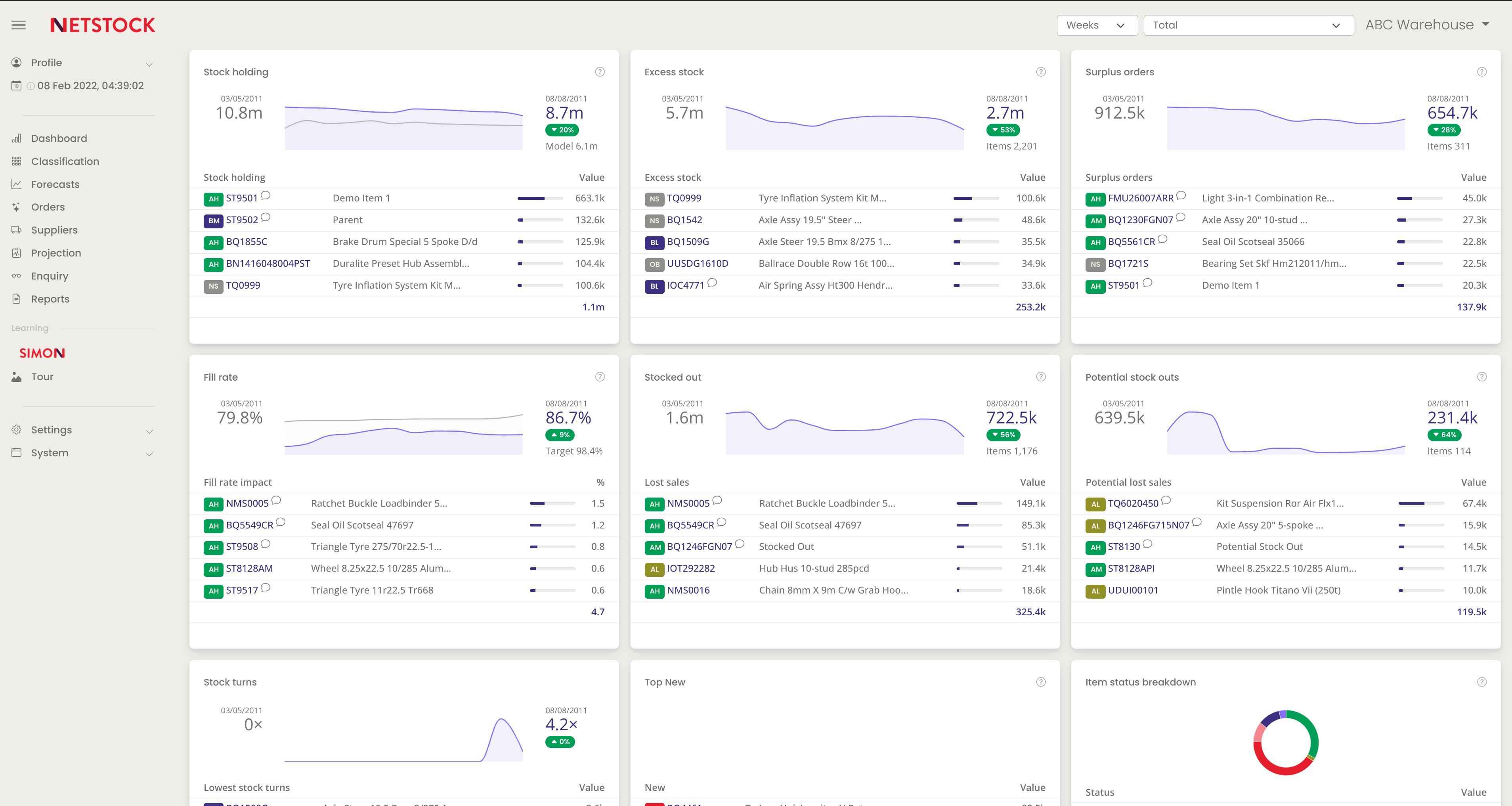
Netstock is a predictive inventory planning platform built to sit on top of an ERP you already run. It is used by more than 2,400 companies across 67 countries, and its whole design assumes your master data lives somewhere else.
That is its position in this list: it is the option for the mid-sized company that has an ERP, has outgrown the spreadsheet built around it, and does not want a two-year planning project.
What makes Netstock different?
The depth of its ERP connectors. Netstock integrates with 11+ ERPs (NetSuite, Sage, Acumatica, Microsoft Dynamics 365, SAP Business One, SYSPRO, Cin7 Core, Unleashed, MYOB and others) with pre-built connections rather than custom integration work.
The practical consequence: your reorder points, safety stock and purchase recommendations are calculated on the data your ERP already holds, and the buyer works from a recommendation instead of exporting to Excel to build one.
Benefits of Netstock
- Pre-built ERP connectors: Connects to your existing system without a custom integration project.
- Inventory classification: Segments your portfolio so slow movers and top sellers are not treated with the same policy.
- Excess and obsolete stock visibility: Surfaces the capital sitting still, not just what is about to run out.
- Supplier performance tracking: Measures real lead time variability per supplier instead of assuming the contracted one.
- S&OP module: Adds sales and operations planning on top of replenishment, so the plan is not only a purchasing plan.
Results reported by Netstock customers: Adventure Operations reduced inventory by over 30%, B&G Ltd cut stock-outs by 61%, and The Little Potato Company improved fill rate by more than 8%.
In the words of their customers: “The ease of use. The dashboard allows access to all critical data points, on one screen.” Adam H., Inventory Control, Retail, 2020.
Disadvantages of Netstock
- It needs an ERP. If your operation runs on spreadsheets, there is nothing for Netstock to connect to.
- Data is not always live. Several users report working with an ERP sync that lags behind the transactional system.
- Limited customization. Reviewers point to little room to adapt screens and reports to a specific process.
- No public pricing and no free trial. Every quote goes through sales.
In the words of their customers: “being 1 day behind our ERP, has been a challenge in the scheduling of our processes, as well as having to wait for changes to update”. Chad H., Replenishment Manager, Wholesale, 2025.
Features and benefits
- Inventory optimization: Calculates safety stock and reorder points by item and location.
- Inventory forecasting: Projects demand using sales history and seasonality.
- Inventory ordering: Turns the forecast into a suggested purchase order per supplier.
- Supplier performance analysis: Tracks delivery reliability and lead time behavior.
- Demand planning and S&OP: Aligns the commercial plan with the supply plan.
- AI Pack: Adds the vendor's AI capabilities on top of the base planning modules.
Implementation
Netstock states that customers are fully operational in 90 days or less. The pre-built connector removes most of the integration effort, so the timeline depends mainly on how clean your ERP data is — item masters, lead times and supplier records.
Pricing is not published: it is quoted per customer based on the ERP, the number of users and the scope of modules, and there is no free trial.
5. Streamline Inventory Management Software

Streamline is AI-based planning software for supply chain, sales, finance, marketing, and operations teams. Streamline contains an inventory planning section.
What Makes Streamline Different?
Streamline focuses on providing an accurate view of inventory levels at the item, channel and location levels, allowing brands, distributors and retailers to scale their businesses efficiently. If your business has less complex operations, Streamline may be an alternative, although its analyses are usually not as advanced.
Streamline Benefits
- Reducing costs: Optimizes stock, minimizing excess inventory and storage costs.
- It reduces human errors and improves the accuracy of records.
- It allows for a more efficient use of available space.
In the words of their customers:” What I like most about Streamline is its ability to provide clear and practical information about our demand and inventory planning.” Streamline client, 2025.
Drawbacks of Streamline
- Software implementation, consulting and team training can represent a high initial cost.
- Inventory control requires close and constant monitoring that can be complex and require additional resources.
- Its focus on tight inventory control can make it difficult to adapt quickly to changes in demand or the market.
In the words of their customers:
“Although Streamline has been a valuable tool for us, there is room for improvement in the user interface and the customization of the reports.” Streamline client, 2025.
Implementation
Implementing Streamline involves integration with the company's existing systems, configuring parameters according to specific needs, and training staff. It's critical to have a dedicated team to oversee the process and ensure a smooth transition.
6. SAP Inventory Management Software

SAP is a recognized enterprise resource planning platform, which makes it easy for companies of all sizes to organize their data in different areas: finance, marketing, human resources, sales, demand planning and inventory management. The specific function for stock control is SAP MM, which has features such as demand management, purchasing management, control and monitoring of stock levels, production planning and cost management.
What Makes SAP Different?
SAP offers complete solutions that are interconnected with all areas of the company, which facilitates decision-making and makes collaboration between teams much more efficient; but it requires a lot of investment in implementation and maintenance, with much longer start-up times.
Benefits of SAP
- It connects with other SAP modules, such as Finance, Purchasing and Sales.
- It can be adapted to the specific needs of each company, although with additional costs.
- Extensive documentation and network of specialized consultants.
In the words of their customers:“It helps us model different variables that change over time for inventory objectives and predict corresponding service levels. We use the product every day and customer support is responsive when needed.” SAP customer, 2024.
Disadvantages of SAP MM
- The cost is high, both in licensing and in implementation, training and maintenance.
- It can take months or years to be fully operational.
- Highly trained personnel are required to set it up and manage it.
- Its interface and functionality require specialized training.
In the words of their customers:” The system can be very complex and sometimes we receive incorrect safety stock recommendations.” SAP customer, 2024.
Features and benefits of SAP
- Real-time inventory tracking: allows you to monitor stock levels, material movements and locations in multiple warehouses, providing complete and up-to-date visibility.
- Replenishment automation: automatically generates purchase orders based on defined minimum, maximum levels and reorder points.
- Advanced warehouse management (SAP EWM): offers detailed control of logistics processes, including picking, packing, cross-docking and location management, improving operational efficiency.
- Integration with other modules: integration with finance, sales and production, ensuring consistency in data and processes across the organization.
Implementation
Implementing SAP involves complex integration with the company's existing systems, extensive configurations, and customization according to specific needs. It is essential to have a team of specialized consultants to correctly parameterize the solution and ensure its alignment with business processes. In addition, it requires intensive staff training for proper adoption. Implementation time varies depending on complexity, but it usually takes several months or even years.
7. Kinaxis Inventory Management Software

What makes Kinaxis different?
Kinaxis stands out for integrating real-time data from all key areas of the supply chain, using AI and machine learning to optimize demand forecasts. It allows us to evaluate future scenarios (“What If”) and offers a comprehensive solution that ranges from planning to complete management of the supply chain.
Kinaxis focuses on the supply chain, but it may be less flexible than Datup to adapt to the specific needs of your business.
Kinaxis Benefits
- It includes functionality for order tracking, sales and operations planning (S&OP), transportation and returns.
- It allows us to analyze the impact of changes in prices or demand before implementing them, facilitating proactive planning.
- It offers advanced tools for evaluating and improving collaboration with suppliers.
In the words of their customers:” Planning with artificial intelligence is a great asset that saves time and provides better understanding and maintainability.” Kinaxis customer, 2022.
Disadvantages of Kinaxis
- The price can be significant, depending on the number of users and activated modules.
- The platform is not intuitive, which can require significant adaptation and training time for users.
- The platform needs significant customization to fit the specific needs of each company, which can make implementation more complex.
- Users have reported a slowdown in data loading, which impairs the speed of decision-making.
In the words of their customers:” It is a platform that tends to slow down, which is attributed to the fact that it does not generate maximum capacity in demand planning, so I would like to be evaluated.” Kinaxis customer, 2022.
“It's slow... sometimes it takes too long to process! A bit of a bad user experience! At first it's hard to understand...” Kinaxis customer, 2022.
Kinaxis features
- Multilevel Inventory Optimization (MEIO) to balance stock levels across the supply chain.
- Simulation of scenarios to assess the impact of changes in demand, supply, or inventory policies.
- Real-time visibility of the inventory through interactive dashboards.
- Inventory quality monitoring using advanced analysis to minimize inefficiencies
Implementation
Implementing Kinaxis involves deep integration with the company's existing systems, such as ERP and CRM, and customizing the platform according to specific supply chain needs.
The process requires the configuration of complex parameters and detailed staff training to ensure efficient use of the tools.
Given the complexity of the system, it is crucial to have an internal team or specialized consultants to manage the implementation and oversee the adaptation of the platform, ensuring a smooth transition and optimizing results.
8. Zoho Inventory Inventory Management Tool

Zoho is a comprehensive business management platform, with tools for all areas of the company such as Sales, Finance, Marketing, Customer Service, HR, and others. It also has a specific inventory module called Zoho Inventory which uses AI for demand prediction, automatic replenishment and storage optimization.
What Makes Zoho Inventory Different?
Zoho Inventory stands out as a solution cloud-based which allows companies to manage their inventory in real time from any device. Its native integration with multiple e-commerce platforms and messaging services makes it a versatile tool for businesses that operate in a variety of sales channels.
Benefits of Zoho Inventory
- Process automation: Reduces manual intervention in order management, invoice generation and notifications, minimizing errors and increasing operational efficiency.
- Centralized control: It allows you to manage multiple sales channels (physical stores, online stores, marketplaces) from a single platform, ensuring real-time synchronization of inventory.
- Scalability: Suitable for companies of any size, from small to medium-sized businesses looking to optimize their inventory management.
In the words of their customers:” It's really simple to use for e-commerce businesses and the support is also very good.” Zoho Inventory Customer, 2024.
Disadvantages of Zoho Inventory
- Limited advanced features on basic plans: Some features may require premium plans, which could represent an additional cost for companies with specific needs.
- Customization options: It may have limitations in customizing complex workflows, which could affect companies with very specific processes.
- Third-party integrations: Although it offers native integrations with several platforms, challenges may arise when integrating with third-party tools that are not directly compatible.
In the words of their customers:” They could improve the software to also focus on the B2B side. It's fine for B2C, but my business has both B2B and B2C and I feel like B2B is a little difficult to manage here.” Zoho Inventory customer, 2024.
“I don't like that there's no parity of functions between Books and Inventory. There are a lot of features that are free in Inventory but not in Books, and features that I pay for in Books but can't use in Inventory, forcing me to pay for both services just to have the same features in both apps. ” Zoho Inventory customer, 2025.
Zoho Inventory Features and Benefits
- Multi-warehouse management: controls stock in multiple locations and makes transfers between warehouses.
- Batch tracking and serial numbers: tracks products individually for accurate traceability.
- Low stock alerts: Get automatic notifications when inventory levels reach critical points.
- Integration with sales channels: Synchronize inventory with platforms such as Amazon, eBay, Shopify and WooCommerce.
- Order and billing automation: generates purchase orders and invoices automatically.
9. Odoo Inventory
Odoo Inventory is the inventory app of an open-source, modular ERP that Odoo says is used by 28 million people. It earns a place here for a reason none of the others share: you can run it for free.
The One App Free plan gives you Inventory alone, with unlimited users and hosting included, at no cost and with no time limit. The catch is in the word one: the moment you need Purchasing or Accounting alongside it, you move to a paid per-user plan for the whole suite.
What makes Odoo different?
Everything else on this list is a planning layer. Odoo is the ERP itself, so stock, purchase orders, invoicing and manufacturing share one database, when a sale is validated the stock moves and the invoice is generated without an integration in the middle.
Be clear about what the automation is. Odoo's replenishment runs on min/max reorder rules and master production scheduling: solid, deterministic logic, but rules you configure, not a model that learns your demand. If what you need is a forecast that adapts to seasonality and external variables, this is the wrong tool on this list.
Benefits of Odoo Inventory
- A real free tier: Inventory alone at no cost, unlimited users, hosting included. Not a trial.
- Open source: you can inspect and extend the code, and you are not locked to one vendor's roadmap.
- Barcode operations: barcode, QR and GS1 scanning with an offline mode, for teams that count stock on the floor.
- Multi-warehouse and multi-company stock in real time, with lots, serial numbers and cycle counting.
- Four valuation methods (FIFO, LIFO, average price, standard cost) for finance to close on.
- Picking strategies wave, cluster and batch — with routing, shipping labels and quality checks.
In the words of their customers: “The interconnection between applications is flawless: when a sale is validated, the inventory updates automatically, and the invoice is generated in a single click.” Patrick K., Vice President, Construction, 2026.
Disadvantages of Odoo Inventory
- No predictive demand forecasting. Replenishment is rule-based, not AI-driven.
- The free plan is one app. A real operation usually needs Purchasing and Accounting too, and that moves you to the paid tier.
- It asks you to adapt. Reviewers report the core is hard to bend to an unusual process.
- Implementation is an ERP project, not a connector: expect data migration and partner cost if you go beyond the free app.
In the words of their customers: “Odoo essentially blocks you from changing the core coding so if your company has a unique or 'weird' way of completing processes then you will need to completely change how your company completes those processes.” Kenneth C., Vice President, Information Technology and Services, 2026.
Implementation
Installing the free Inventory app takes minutes. Running Odoo as your operating system is a different project: it involves migrating item masters, suppliers and stock balances, and most companies do it with an implementation partner.
Odoo rates 4.2 out of 5 across more than 1,300 reviews on Capterra, the largest review base in this comparison, and a fair reflection of a tool that many companies adopt and some outgrow.
Is AI inventory software worth it?
It depends on one number: how much money you currently have frozen in stock that is not turning. If your excess inventory and your stockouts show up in the same monthly review, the answer is usually yes.
The payback comes from three places. You buy less of what will not sell, you stop losing sales you had already earned, and your planners stop rebuilding the same spreadsheet every Monday. In our experience, teams that replace manual reorder point calculation with AI recover the subscription cost well before the first year closes, the real constraint is data quality, not the model.
Where it does not pay off: operations with few SKUs, stable demand and a single warehouse. There, a well-maintained spreadsheet is still competitive.
Which AI inventory management systems are best for distributors?
Distributors have a specific problem: hundreds of suppliers, a different lead time for each one, and stock spread across warehouses that rarely talk to each other. The tools that work here optimize purchasing and redistribution together, not just demand forecasting.
From this list, Datup, RELEX and Kinaxis are built for that complexity. Datup fits mid-sized distributors that need results in weeks; RELEX and Kinaxis are aimed at large enterprises with dedicated planning teams and longer implementation cycles.
What to check before signing: whether the tool handles lead time variability per supplier, whether it recommends transfers between locations, and whether it classifies your portfolio (ABC, FSN, XYZ) so you are not treating a slow-moving spare part like a top seller.
Can an AI agent manage inventory across multiple locations?
Yes, and that is where the difference against a traditional system shows up fastest. An AI assistant reads stock across all your locations as one network: it detects the branch about to run out, finds the one holding excess of the same SKU, and proposes the transfer before you place a new purchase order.
The practical limit is governance. Most teams start with the assistant recommending and a planner approving, then automate only the low-risk decisions — routine replenishment of A-class items with stable demand. Ask the vendor how approval rules and permissions work per location before you assume anything is autonomous.
Conclusion: What is the best inventory management software with AI in 2026?
Determining the “best” inventory management software with artificial intelligence (AI) in 2026 depends on the specific needs of each company, such as size, sector and operating processes.
In addition, you must take into account factors such as the ease of integration with existing systems (such as ERP, CRM, WMS, e-commerce, POS), the ability to adapt to changes in demand, the scalability to grow with the company and the level of support and training offered by the supplier are also crucial.
An ideal tool should be able to provide accurate forecasts, real-time inventory optimization, order automation, and detailed data analysis to improve decision-making and operational efficiency.
The successful implementation of such software must also consider the short and long term return on investment (ROI), evaluating not only the immediate benefits, but also the impact on reducing costs and improving the customer experience.
.png)
%20Software%20for%202025%20(3).png)